DSY GENERAL INFO
PLEASE DO THESE THINGS IN YOUR DOWNTIME
- WATER THE PLANTS!!!
- SPRAY AND WIPE BENCHES AND COMPUTERS
- TOP UP BUSINESS CARDS, MELBOURNE BOOKLETS
- CHECK TO MAKE SURE WE HAVE PAPER, TONER AND CHECK IN BOOKLETS IN THE COMMS CUPBOARD - LET MANAGER KNOW TO ORDER MORE IF NEEDED
ALL BOOKINGS
Fix the mobile number up, get rid of international numbers
Check cc token, PLEASE COPY AND PASTE THE NAME INTO THE DESCRIPTION
Check the OTA notes
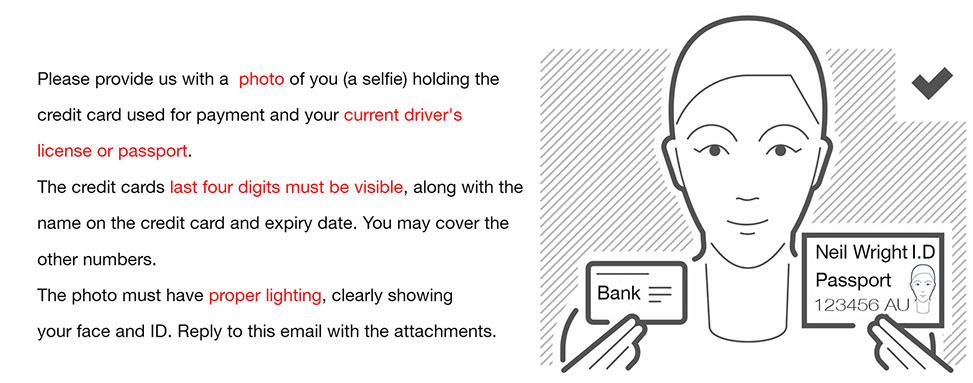
Request selfie ID + CC if they are going to be a late arrival
Leave notes in the booking in regards to payment
LEAVE NOTES!
CHECK INS
Greet guest, ask for Credit Card and Drivers Licence/Passport.
Take CC details in token - must match the CC details for reservation or be able to provide.
(CC should match what is in token, if not, question why not to avoid someone booking with another persons CC.) Add client if need be to match to CC details.
Take drivers licence or passport number, D.O.B and fill in address (this is in case they leave something behind and want it sent - and to see where our guests are coming from)
Make sure all payments have gone through - including for parking and extras - unless QANTAS, JETSTAR HOOROO (charge on departure) or other travel agents who invoice us (ensure invoice is sent)
Ensure contact details are correct
If guest asks for late check-out, extra servicing, PUT IT THROUGH AS A REQUIREMENT, TICK APPEAR ON HOUSEKEEPER'S REPORT AND CREATE SUNDRY ACCORDINGLY
Sign reg card and explain how to open door, 24hr access and wifi
Check-in in rms, and put reg card away
CHECK OUTS
Ask what room and collect keys from guest
If they have car park explain dropbox on exit - they will need there room key to get downstairs
Ensure all payments have been settled - process QANTAS JETSTAR HOOROO etc.
Check car parks out once you physically have the fob, chase up if not
Message through in Whatsapp that room has departed
Check out in RMS, tick on housekeeping sheet
CAR PARKS
If a guest wants to add in car parking, they can do this when booking directly through our website. You need to check the OTA notes as this will say when they have booked parking.
To add a car park, you need to create the sundry charge in the room reservation in extras. You then need to add a room and select DSY Car Parks etc and choose a car park from there. Once you have done this you need to add the guests details (copy the mobile number from the room reservation) you will then need to take out the reference number, change the booking source, travel agent, res type and sub res type to DIRECT.
You then need to email the guest for the make and model of the car and make sure there are no tow balls or bull bars on the car (especially for DFZ and AAH). Once received the make and model please put this in the reservation so we know. You will need to double check on car advise if the car will fit. Please check the height, weight and length of the vehicle.
DSY + PHA $20 per night
AAH + DFZ $25 per night
DSY - Height 2.1metre, Weight 4 tonnes, Length 5metres
DFZ - Height 1.5m, 1.75m, 1.9m, Weight 2 tonnes, Length 5metres
AAH - Stacker Height 1.75m, 1.9m, Weight 2 tonnes, Length 5metres
Standard 2.1 Metres, Weight 2 tonnes, Length 5metres
PHA - Height 1.9m, 2.1m weight and length dont matter
LATE CHECK OUT OPTIONS
As we dont have housekeeping here 24/7 our late check out options are:
10am standard
11am complimentary
12pm $35 fee
If a guest is requesting to stay later, you must advise them that they will need to pay another nights accommodation to do this. If they request a discounted rate they cannot have this!
At 10.15am, whoever is on reception needs to go up and knock on doors that havent departed, this way you can give them until 11am to depart or they can pay for a 12pm check out. If they look dodgy tell them 11am is the latest as they will probably take forever to leave and it will end up being 12pm by the time they get out.
At 12pm, whoever hasn't departed you will need to go up again and chase them out, if you dont feel comfortable by yourself (eg. a dodgy guest in room) get whoever is on maintenance or HK supervisor to go up with you and get them out of the building. If the guest isnt there and you cant get ahold of them and they are dodgy, we have permission at any stage to enter a room and start packing their items up. They cannot refuse you entry to their room. If you ever have troubles with this and are unsure on what to do please call the manager so they can advise.
LATE ARRIVALS - GETTING REG CARD SIGNED THE NEXT DAY
If a key is put into a safe for a guest and they have not come down to reception by 11 am the following morning, please check them out of SALTO plug in PPD machine on the computer closest to Robyns desk, go into SYSTEM, click on PPD. Click on the room number that you check out and press download which is the big blue on on the bottom right of the screen.
The PPD will then update (MAKE SURE ITS PLUGGED IN). Go up to the room, scroll down through the PPD to update room, find the room number on the ppd, press the green, scroll down to update locks click ok, hold against the door. This will disable access to the doors for the guest.
EXTENSIONS
If a room is extending and have originally booked with Booking.com, Expedia, wotif.com, hotels.com etc.:
Go to booking
Click on rooms tab
Add a room, clearly the same room so the guest does not have to move
Get rate from our website and charge accordingly - MAKE SURE THIS IS COMMUNICATED TO GUEST BEFORE CHARGING
Check to see if parking and requirements need to be extended
Copy and paste mobile number from original booking to new room, hit enter and select correct client
Go to housekeeping tab in RMS booking
Click on departure task in FIRST room and delete (to tell housekeepers this is not a departure room and does not need to be cleaned)
In housekeeping notes add EXTENSION
Click on second room
Delete arrival task, add EXTENSION in notes and the date the extension is effective as of I.E. - EXTENSION 31/01
If staying more than 7 nights in total, add in a service in housekeeping chart
If guest booked with BookingButton, email or phone (directly through us) we can just make changes to the original booking rather than creating a new one. Simply change the departure date to the new departure date, work out price difference and charge accordingly. Again, make sure this is communicated with guest first to ensure they approve.
Go to housekeeping tab in RMS booking and make sure it is clear to housekeepers that it is an extension
If staying more than 7 nights in total, add in a service in housekeeping chart
When guest extends, it needs to be in person so you can extend keys straight away! Print a new reg card and get them to sign as the dates will be different to original reg card
ROOM MOVES
The way a room move is done depends on whether or not the guest has stayed in their original room or not.
If a room move is being done without the guest having actually occupied the room for the night (moving the day of arrival), you can simply change the room in the system
If the guest spends one night in the room, then decides the next day they want to move you need to split the booking to show exactly which room was occupied by the guest each night. As each apartment is individually owned we need to ensure the payment is on the room that was occupied that night. You just need to split the booking (by adding a room via the tab in RMS) and ensure the dates and room details reflect exactly where the guest has stayed
If the guest booked through an OTA you need to copy and paste the reference number into the emails to get the nightly breakdown. Treat each room as a separate booking, but the group res should reflect the exact total that is in the email
To actually move the money on to the new room from the original room, you need to refund the amount that you wish to move to direct credit, on the new room you then receipt that amount from direct credit
Basically, you are refunding that money to us, and then receipting it to the room it should be on
Please ask for help the first time you do this alone, it will be confusing at first! If you are on a close and not sure, please leave a note for someone to help you with it next time. Moving the money around is not an extremely urgent thing, the most important thing is that the reservation in RMS reflects the exact rooms that are being occupied by the guest
Make sure you check out the room they are moving from, communicate to housekeeping that it needs to be cleaned, or if housekeepers have gone home for the day leave the booking in the room otherwise a new booking can drop into a dirty room. If the stay is 7 nights or more, please also check the housekeeping tab to make sure the service still falls in the middle of their stay
NO SHOWS
If a guest doesnt show on there day of arrival, please email and call the guest to find out when they will be checking in/why they didnt check in
One night booking
If it is a one night booking, and they have failed to inform us that they wont be arriving at all then you need to email them and find out what happened. Because they havent notified us at all, there is NO refund. You need to void the charge in the accommodation and leave the reservation in credit, you will then need to change the status of the reservation to unconfirmed. Once this has been done, email the manager with the reservation code and why the guest didnt check in. If you cant get a hold of the guest, make sure you tell the manager this.
Longer booking
Still email and call the guest to find out when they will be checking in. If they want to cancel the booking you need to let them know to talk to there travel agent. There will be NO refund for nights missed out on. If they will be checking in on another day, leave a note in the reservation and in the daily handover that this person will be checking in and what date they are checking in. Email the manager so they are aware of the situation.
TRANSFERRING MONEY TO THE GUESTS ACCOUNT
Only do this for regular guests and get approval from Manager
Void the charge in accom (and extras if there is parking)
Refund the money charged to direct credit - make a note that you are transferring the money to a guests account
Go into guest account which is on the guest details side of a reservation, next to the cc token button
Receipt the same amount of money from direct credit into the guest account make a note when charging
In the guest notes - make a note of the amount in the guest account
ADDING CLIENTS
When there's a group booking with multiple rooms, or multiple names i.e Bothar Boaring, we need to have each persons details in accordance to which room they're staying in.
Click on clients tab
Add and put in all details
Then click on their room and add their details to each so its personalised and we know who is where at all times
Set primary client for person who made booking
TRANSACTIONS
The only transaction that should be going through accom is their initial payments for the room, extensions and credit card surcharge for Booking.com, phone, direct payments.
When guests ask for late check-outs, early check-ins, car park, absolutely anything, respond to it straight away, make known any and every additional charge.
Put it into their booking - STRAIGHT AWAY, either as a requirement, sundry charge or housekeeping note.
It is not good enough to just put it in the reservations notes as housekeeping wont see these extra details
To add parking, rollaway, cots, early/late check-in/out:
Click on extras
Create Sundry charge
Then receipt payment
Add transaction fee to these payments as well
SENDING INVOICES
If you want to send out an invoice for people wanting to pay via bank transfer;
Click on accom
Press Create Rate to pull through the base tariff amount
Right click box and add our account details:
Locates in the ongoing FYIs in handover
Click Tax Invoice
Email off - make sure email is correct before sending
In reservation notes add Inv Sent with the date and initials
INTERCOM IN ROOM
Button 1 - to speak to person at front entrance
Button 2 - camera for front entrance
Button 3 - call reception
Button 4 - unlock after hours entrance door
SNAP FITNESS PASSES
In the folder is the sheet which you fill in the guest details, room number, pass #, how many days they want it for etc - PLEASE FILL THIS ALL IN.
Guests must sign the waiver which are also in the folder. Have them sign it and put it in the signed forms pouch.
Give them a pass.
When the guest returns the pass, find their form and write on there that they returned it and have them sign it again. (this way we will know that the guest has brought it back)
IN RMS
Go into extras
Type snap
Enter the amount of days they are using it for. ($10.00 per day)
You must also take a $50.00 bond for the pass (which is refundable when they return it)
When the pass is returned, refund the $50.00 bond.
NIGHT PROCEDURE
When the night person arrives at 2:30pm or 4pm you should be checking how many arrivals you have and if they all have ETAs if not start making phone calls before 5:00pm.
After you have done that get your Fitzroy cleaning email ready. There is a template in the email templates please follow that. Make sure you are copying and pasting the key safe codes over and NOT writing them down this is how mistakes are made.
6.00pm Do the banking for DSY and DFZ
At 7.00pm check that your leftover registration forms match the in/out movements in RMS (sometimes people forget to click checkin).
If there is extra or less reg forms check the already signed ones and check for extensions as they may have keys already and may just need to be checked in.
8.00pm Follow up on the people that have not checked in. Find out if they are running behind and get CC and ID scans incase they dont make it before 10pm, this also helps if they rock up at 9:55pm because all you will need to do is re make the room key and get them to sign the reg form.
Print the movements cleaning report for tomorrow on this report you want to write down all the information you can to help the housekeeping supervisor. You need to cross off any extensions, write down ETAs, Highlight late check outs and early check ins
Movements Cleaning report:
RMS > Reports > Movements Cleaning > Select date > Select property > Build > Print.
9:00pm start doing your 1 shot keys and late arrivals. In the main reception draw is a late arrivals sheet to fill in while you're doing that which will make your life ten times easier when you go to load the keys into the safe and email the person on call later on:
One Shot keys
Login to Salto : Admin
Password: admin
Click Users
On the second page double click One shot 1
Change Date and expiry time to 7am
Click zones on the right hand side and make sure they have access. (Front door and all rooms)
Save & update Key
Please load at least 3 keys every night into the drop box.
The code for the keys should be as follows:
843 the day eg. 30th and the number on the key.
EXAMPLE: 843301, 843302, 843303
Late Arrivals
If you have a late arrival you will need to put their room keys out for them in the safe drop box. As we do not know who we are leaving these keys out for, we need to have a photo of the guests photo ID and their credit card. Basically we require the details that you would be getting when checking them in in person. Once you have these details;
Use the mobile number in RMS if Australian number, otherwise use the res number (as international numbers have too many digits) and send the guest the check in procedure through correspondence in their booking.
Make a room key for them in Salto but make it expire at 7am so that we can formally check them in and get them to sign the reg form.
In the draw with the CP remotes you will find the plastic holders and guest information cut outs, place the card into the plastic holder fill out Name , Level and Room no. on the cut out and tape it to the plastic holder. Highlight the message where it says it will expire.
Write late on top of their reg forms, highlight it and put aside so that the person in the morning can chase them up.
Nitel
Open a new page and type in the search bar nitel it should load automatically.
Select managers portal
In the search bar in the light green section type the guests surname.
In the general comment section select edit and write any important notes followed by the key safe code. E.g Please get CC details before you give them key code. CODE: 639741# (always put a # on the end that is what makes the key drop) and press ok.
These notes should also be in the late arrivals email sent to the night manager (usually Nick)
If we need Credit card details or charge a bond tick the box CC and tick the late box for all late arrivals.
After you have entered in everyone's notes and ticked that they are late click on to your contacts in the green section at the top of the page to check who is on call for the night.
Email the person on call your list of late arrivals and 1 shot keys please follow the email in the email templates its less confusing and add in any important notes e.g Burns - 502 - 693062# couldnt get a hold of them. told nitel to take $200 bond on arrival.
Please note - no keys should be left out without CC details for Booking.com/dodgy looking bookings, if we need to get CC details leave a note to Nitel asking them to get the details before revealing safe code.
Key safe
Grab the car fob keys hanging up near Robyns desk, your trusty late arrivals list and head on over to the key safe out the front.
Open the safe and on the screen it should say admin. Press 1 to go through the menu, press 9 to go back or cancel and press # for yes. So go though the menu pressing 1 and find CLEAR ALL CODES (press 9 if you accidentally go past it) Press #, Press # again then press 9.9.9 # This should clear all codes (Happy days) then go back through the menu and find CHANGE CODE it will ask you to pick which hook you want select (always try and use the lower level of hooks and keep the keys one hook apart so that they dont touch) e.g 11 then it will ask you for the code entre the code then press #. The code is the phone number/res number you sent the guest in the late arrival correspondence or the 1 shot key code e.g 28100117. Hold the key ring in place up and under the number/ red light and wait for it to lock or press # once its in position. If you stuff up just go back through your menu select DROP ALL KEYS then select CLEAR ALL CODES & start again.
Once you have done that, lock her up and keep your late arrivals list on the desk for the morning person to check off in the morning.
Give reception a tidy up.
10:00pm put up the after hours phone number laminate, Lock the front door, close down your browsers and spotify.
Turn off the speaker and turn off all the lights but the one that says it stays on.
Clock off tanda grab your stuff, lock the sliding doors and you're outta here!
Phones will automatically divert to Nitel at 10pm
HOUSEKEEPING HOW TO:
To print daily movements sheet:
Reports> Daily> Movements cleaning
Check the date is for today
Check the property is for South Yarra
Fill this sheet in, check your check in rooms (squiggly line through, dont allocate a housekeeper, the room checker will check this), your extension rooms and rooms with requirements. Once this is filled in you can allocate rooms to housekeepers that are coming in for the day.
To allocate to housekeeping:
Housekeeping> Housekeeping roster>
Check the property is South Yarra
Check the date is todays date
Roughly try to allocate the rooms in room order, and the same amount of time.
(1 bed = 1hour. 2 bed = 1.5 hours. 3 bed = 2 hours.) Once all rooms are allocated you need to print these sheets for the housekeepers.
To print housekeeper sheets:
Reports> Daily> Housekeepers>
Check the property is for South Yarra only
Check the date is todays date
Select group by and set this as housekeepers
Select report type and set this as summary
Press Build> and then Print